How To Choose The Best Domain Name
Hosting
(NOTE: It is recommended that you read this page on a laptop or desktop computer, as the resources mentioned here below are not mobile optimised. For your convenience, the shortened version of this URL is http://bit.ly/choose-best).
We now come to the issue of hosting. There are lots of hosts out there and many of them claim to be the best. By popular acclaim, however, the most-loved and respected hosting company, the one that provides the most professional service, the most comprehensive resources, the best and quickest, most reliable support (via email, phone and online chat) all at incredibly low prices, is Bluehost.
Bluehost is also known for its extremely low downtime, its speed of access and its general reliability. This host also uses cPanel for its user interface, meaning that you have easy access to Fantastico or Fantastico Deluxe, with all its “one-click” installs and features. You also have unlimited bandwidth, unlimited domains and subdomains (with the Plus and Prime accounts), secure server, shopping cart, email, autoresponders and mail forwarding, SEO and Internet marketing tools and a huge number of resources too numerous to list here. All of this is from just $3.95 a month (for the Basic account).
Once you get to the Bluehost home page, click on the green Get Started Now button and you will then see the option of three hosting packages. The Basic package, which is the cheapest, allows only one website per account, so if you only want to have one website you can select this (you can always upgrade later). If you want several websites on your account select the Plus or Prime account.
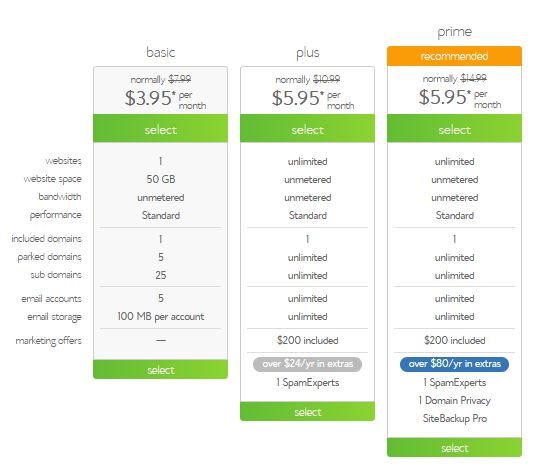
There are always special offers running and so it would be impossible to describe in detail here what may be available at the time you look at it, as things may have changed by then.
When you’ve decided which package you want and clicked the green Select button you will be taken to the next page, which asks you to enter your domain. If you already have a domain (as you will have if you have registered one just previously) enter this in the box on the right (while the box on the left will start a new search, which you won’t need as you have already registered your domain at Namecheap).
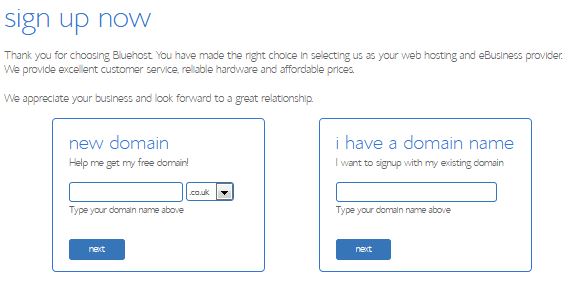
Complete the registration process, enter your hosting preferences and complete the billing section. Be sure to check any Terms of Service box.
You will have to go back to your Namecheap account and enter the nameservers for your hosting account; you may also have to do various other little things before you can start uploading you site to your new hosting account’s server. These things change from time to time so it is best to consult the Namecheap support team for specific instructions (they have online chat support which is quick). You will be sent full details of your nameservers and all DNS setting of your hosting account in a welcome email from Bluehost so that you can give any relevant details of these to Namecheap.
Alternately, if you prefer a much better service (more comprehensive list of facilities available, faster transfer speeds and, more importantly, support technicians on call 24/7 who are all native English speakers and who are all highly trained and expert in their field), but which is slightly more expensive, then see the illustrated web hosting tutorial on my site Choosing a Web Host, also available as an app and an ebook. I now host all my sites on InMotion, and I'm happier in my choice of hosting than I've ever been.
1 Introduction | 2 Activity + Location | 3 Activity | 4 Location | 5 Domain Extensions | 6 Registration | 7 Hosting | 8 Conclusion
How To Choose The Best Domain Name
Privacy Policy Help About Us Contact Us Disclaimer Terms and Conditions
s
This website is property of How To Choose The Best Domain Name. © 2018 and thereafter. All rights reserved.